
Introduction
Running a small business already comes with enough tiny problems.
A customer pays late. A receipt disappears. A bank transaction shows up with a description that looks like it was written by a tired robot. Then tax time arrives, and suddenly that spreadsheet you promised yourself you would keep clean has become a crime scene.
This is where AI accounting software starts to sound pretty appealing.
Instead of manually sorting every transaction, modern accounting platforms can help categorize expenses, capture receipts, reconcile transactions, analyze financial information, and surface useful patterns. The important part is that AI does not magically turn accounting into a completely hands-off job. You still need accurate records, sensible categories, and human oversight.
That distinction matters.
The best AI accounting software for a small business isn’t necessarily the platform with the most impressive AI label slapped across its homepage. It is the one that fits the way the business actually operates.
For a freelancer, that could mean simple invoicing and expense tracking. For a growing company, it might mean payroll, inventory, reporting, accountant access and deeper automation.
So let’s make this less complicated.
The Thing Nobody Actually Says Out Loud
Most small business owners don’t wake up thinking, I really hope I get to reconcile some transactions today.
They want to sell something.
They want customers to pay them.
They want to know whether the business is actually making money.
Accounting is necessary, but it usually isn’t the reason someone started the business in the first place.
That’s why AI accounting software is interesting. It attacks some of the repetitive work surrounding bookkeeping rather than trying to replace the entire accounting process.
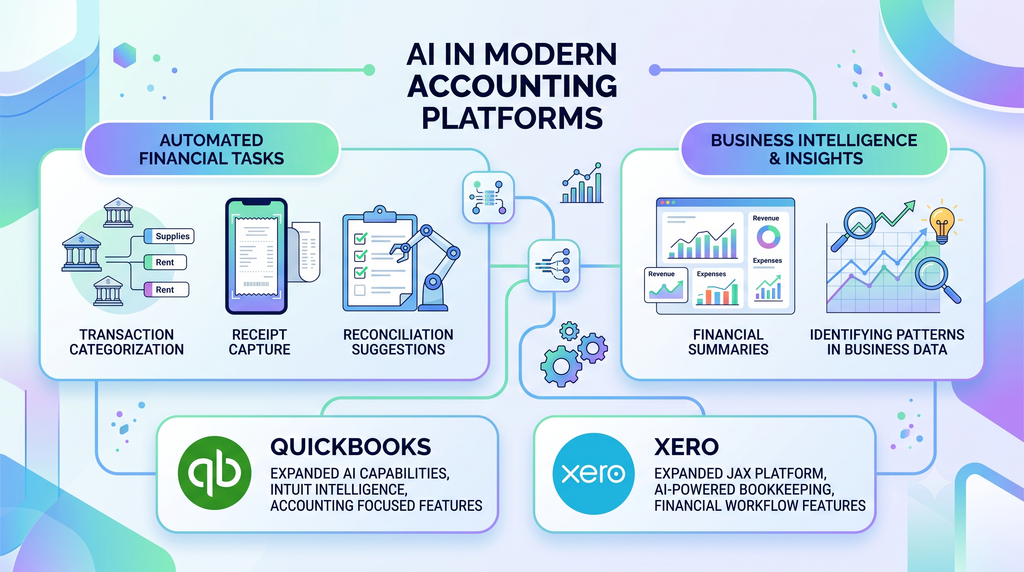
Modern platforms can help with tasks such as transaction categorization, receipt capture, reconciliation suggestions, financial summaries, and identifying patterns in business data. QuickBooks for example, has expanded its AI capabilities through Intuit Intelligence and accounting focused AI features. Xero has also expanded its JAX platform with AI powered bookkeeping and financial workflow features.
But here’s the part that gets buried underneath the shiny product screenshots.
AI can reduce accounting work. It does not remove accounting responsibility.
That’s a very different promise.
Imagine your business receives a $1,200 transaction from a supplier. An AI system may recognize the merchant and suggest a category based on previous activity. That’s useful.
But what if the transaction was actually a refundable deposit?
The software doesn’t know your business relationship with that supplier simply because it can recognize the company name.
This is where human review still matters.
The same thing happens with expenses. AI may identify patterns based on previous transactions, but accounting categories aren’t always obvious from a bank description. A transaction labeled “Amazon” could be office equipment, inventory, software, packaging or something completely unrelated.
Apparently, even Amazon cannot tell us what we bought from Amazon.
That is why the strongest use of AI accounting software is usually assistance rather than blind automation.
The software handles predictable work. You review exceptions.
That approach becomes especially useful as transaction volume increases. Manually checking 20 transactions is annoying. Checking hundreds every month becomes a genuine time problem.
AI can help narrow your attention toward transactions that actually need it.
There is another important point for small businesses: accounting software is not only about bookkeeping.
Your financial data can influence decisions.
How much cash is available?
Which customers owe money?
Which expenses are increasing?
Are margins getting worse?
Can the business afford another employee?
Those questions are more useful than simply knowing whether a receipt has been categorized.
The best platforms increasingly connect accounting information with forecasting, reporting, payments, payroll, and other business workflows. QuickBooks describes its newer AI capabilities as combining financial data with AI and business intelligence to provide insights and automate financial tasks. Xero has similarly expanded its AI platform around bookkeeping, financial workflows, and cash-flow management.
That changes the role of accounting software.
It starts becoming less like a digital filing cabinet and more like a financial control panel.
But don’t confuse that with an accountant.
Software can process information incredibly quickly. It doesn’t understand your entire business situation, your tax strategy or every unusual transaction.
That’s still where professional judgment earns its keep.
How This Actually Works The Real Mechanics
AI accounting software usually combines traditional accounting systems with automation and machine learning or generative AI features.
The accounting foundation still matters.
You need a ledger. You need transactions. You need accounts. You need reports.
AI sits on top of that information and helps automate parts of the workflow.
Think about a typical month.
Money enters your business through payments.
Money leaves through payroll, subscriptions, suppliers, rent, advertising, software, and other expenses.
Your bank account contains the raw activity.
The accounting platform tries to turn that raw activity into organized financial information.
AI can assist with several parts of that process.
1. Transaction categorization
The software looks at transaction details and previous accounting patterns to suggest categories.
If your business regularly pays the same software company, the system may recognize the transaction and suggest the category you previously used.
That saves time because you aren’t starting from zero every time.
The catch is simple: suggestions aren’t automatically correct.
New vendors and unusual purchases deserve more attention.
2. Receipt and document capture
Instead of manually typing information from every receipt, modern accounting platforms can use document scanning or OCR to extract useful information.
You photograph or upload a receipt.
The software reads information such as the merchant, date, and amount.
Then it can use that information to help create or match an expense.
This is particularly useful for people who collect receipts in places where receipts really shouldn’t be stored.
Like the car.
Or a backpack.
Or that mysterious drawer containing three years of cables.
3. Bank reconciliation
Reconciliation is one of those accounting tasks that sounds boring because it is boring.
Your accounting records need to match your actual bank activity.
AI and automation can help match transactions and identify items that don’t line up cleanly.
That means you spend less time comparing records manually and more time looking at exceptions.
4. Financial questions
Some newer accounting platforms are moving toward conversational interfaces.
Instead of navigating through multiple reports, you can ask questions about business information in plain language.
For example:
- How much did I spend on software this month?
- Which customers have unpaid invoices?
- How did revenue change compared with last month?
- What expenses increased recently?
The value isn’t the conversation itself.
The value is getting useful information from your existing financial data faster.
5. Forecasting and financial insights
AI can also help identify patterns in financial information and generate forecasts.
But forecasts are not promises.
A forecast based on historical information can be useful for planning, while still being wrong when the business changes.
A major customer leaving, a large unexpected expense, or a sudden sales increase can make yesterday’s pattern much less useful.
So when evaluating AI accounting software, look beyond the words “AI-powered.”
Ask what the AI actually does.
Does it categorize transactions?
Capture receipts?
Reconcile accounts?
Answer questions?
Forecast cash?
Automate invoices?
Flag unusual activity?
Those differences matter far more than the marketing label.
Comparison What’s Actually Different Between the Options
| Software | What it actually does | Who it’s for | The catch |
|---|---|---|---|
| QuickBooks Online | Accounting, reporting, invoicing, payroll integrations and expanding AI automation | Small businesses wanting a broad accounting ecosystem | Can become expensive as needs grow |
| Xero | Accounting, reconciliation, reporting and AI-powered financial workflows | Small businesses and teams that value collaboration | Some U.S. payroll capabilities depend on integrations/services |
| FreshBooks | Invoicing, expenses, time tracking and accounting workflows | Freelancers, consultants and service businesses | Less suited to businesses needing complex accounting operations |
| Zoho Books | Accounting, invoicing, expenses and workflow automation | Budget-conscious small businesses and Zoho users | Best experience may depend on the wider Zoho ecosystem |
| Wave | Core accounting, invoicing and receipt-related tools | Freelancers and very small businesses | Fewer advanced features than larger accounting platforms |
There isn’t one platform that fits every small business.
QuickBooks is built around a broad accounting ecosystem and has significantly expanded its AI capabilities. Xero has been pushing AI further through JAX and its connected financial workflows. FreshBooks focuses heavily on the needs of service businesses, while Zoho Books and Wave can make sense for businesses where cost and simplicity matter.
The important question isn’t “Which company has the most AI?”
It’s “Which accounting problem am I actually trying to solve?”
What Actually Happens When You Try This
The biggest mistake is choosing software based on a feature list rather than your actual workflow.
A freelancer and a 25-person ecommerce company can both technically be called “small businesses.”
Their accounting needs are not remotely identical.
A freelance designer might care about invoices, expenses, time tracking, client payments, and simple reports.
An online store may care about inventory, payment processors, sales tax workflows, purchase records, refunds, and much more.
That difference completely changes what “best” means.
One useful way to approach the decision is to start with your monthly workflow.
Write down what happens to your money.
Where do sales come from?
How many invoices do you send?
How many bank transactions happen each month?
How many employees do you have?
Do you carry inventory?
Do you work with an accountant?
Do customers pay through Stripe, PayPal, bank transfers, cards, or another system?
Once you write those things down, the software comparison becomes much easier.
You are no longer comparing 50 features.
You’re comparing workflows.
Another pattern worth watching is how much attention the software demands after automation.
A platform saying “AI-powered reconciliation” sounds impressive.
But if you still have to manually correct half the suggestions, the headline matters less.
That doesn’t mean the AI is useless.
It means you should measure the actual time saved.
Suppose your monthly bookkeeping normally takes six hours.
After automation, perhaps it takes three hours.
That’s meaningful.
If it takes 5 hours and 45 minutes because you spend the saved time fixing bad categorization, you’ve mostly purchased a new interface.
This is why trial periods are valuable.
Use the software with actual business activity if the provider permits it.
Connect the accounts you are comfortable connecting.
Import representative transactions.
Create invoices.
Check the reports.
Look at the reconciliation workflow.
Then ask the uncomfortable question:
Did this actually make my accounting easier?
Not “Did the dashboard look modern?”
Not “Did the AI answer a question?”
Did it reduce work?
That is the test that matters.
The Advice Everyone Gives vs. What Actually Works
“Just choose the software with the most AI.”
Not necessarily.
AI isn’t one feature.
One platform may have excellent transaction categorization while another focuses on conversational financial analysis. Another may offer stronger document automation.
The better approach is to identify the accounting tasks you repeat most often and see how each platform handles those specific tasks.
“Free software is always better for a new business.”
Free is useful.
Free is not automatically better.
If a free platform saves you $20 a month but creates several hours of extra manual work, the real cost is your time.
For a very small business with simple finances, a free option may be perfectly reasonable.
For a growing business, paying for better automation can make sense.
The decision should be based on total value, not the monthly subscription alone.
“AI means you don’t need an accountant.”

This is one of the more dangerous assumptions.
AI can automate repetitive accounting tasks.
It doesn’t automatically replace professional judgment.
Tax rules, unusual transactions, business structure, financial planning, and complicated reporting can require expertise that software alone shouldn’t be expected to provide.
Use AI to reduce repetitive work.
Don’t use it as an excuse to stop checking important financial decisions.
“Just connect every account and let the software handle everything.”
Slow down.
Financial data deserves some caution.
Before connecting accounts or enabling automation, understand what data the service accesses, how permissions work, and which actions can happen automatically.
Start with the workflows you understand.
Then expand automation once you trust the results.
That is much safer than turning every switch to “automatic” and hoping accounting has entered its self-driving era.
The Practical Part What to Actually Do
1. Write down your five biggest accounting headaches
Don’t start by browsing software websites.
Start with your problems.
Maybe invoices take too long.
Maybe receipts are everywhere.
Maybe reconciliation is painful.
Maybe you don’t know your monthly cash position.
Write down the five tasks that consume the most time.
Those become your evaluation criteria.
2. Separate must-have features from nice to have features
Your business may not need inventory management.
It may not need payroll.
It may not need advanced forecasting.
Don’t pay for features simply because they exist.
Create two lists:
Must have: features the business cannot operate comfortably without.
Nice to have: features that would be useful but aren’t essential.
This makes software pricing easier to understand.
3. Check accountant compatibility
If you already work with an accountant, ask which platforms they support.
This can save a surprising amount of friction.
Your accountant may already have experience with a particular platform and know how to review its reports, transactions, and workflows.
You don’t have to choose software solely because your accountant uses it, but ignoring their workflow can create unnecessary work later.
4. Test the automation, not the marketing
During a trial, don’t spend 20 minutes admiring the dashboard.
Run actual tasks.
Import transactions.
Capture a receipt.
Create an invoice.
Reconcile a few transactions.
Generate a financial report.
Ask the AI a useful financial question if that feature is available.
Then check the output.
5. Measure time saved
Before automation, estimate how long your bookkeeping takes.
Then measure it again after using the software.
This gives you a practical benchmark.
If the software saves three hours every month, you can compare that benefit with the subscription cost.
That is much more useful than saying a platform has “powerful AI.”
6. Review AI-generated suggestions
Don’t blindly accept categories, matches, or financial insights.
Look for errors.
Pay particular attention to unusual purchases, new vendors, transfers, refunds, and large transactions.
The more unusual the transaction, the less comfortable you should be with automatic approval.
7. Keep a human review point
Even if automation handles most routine work, establish a regular review.
That might be weekly or monthly depending on transaction volume.
Check unusual transactions.
Review reports.
Look for missing information.
Confirm that your bank and accounting records make sense.
Automation works best when someone is still paying attention.
Questions People Actually Ask
What is the best AI accounting software for small businesses?
There isn’t one universal answer because small businesses have very different accounting needs. QuickBooks, Xero, FreshBooks, Zoho Books, and Wave all approach small-business accounting differently. The right choice depends on factors such as business size, invoicing needs, payroll, inventory, accountant access, and how much automation you need.
Can AI replace a small business accountant?
AI can automate many repetitive accounting tasks, but it should not automatically be treated as a replacement for professional accounting judgment. AI can help categorize transactions, reconcile records, summarize financial information, and automate parts of bookkeeping. Complex tax questions, unusual transactions, financial planning, and important business decisions may still require a qualified professional.
Is AI accounting software worth it for a small business?
It can be worth it when automation removes enough repetitive work to justify the cost. The biggest benefit usually comes from reducing manual data entry, transaction categorization, receipt processing, reconciliation, and reporting work. A very simple business may not need advanced AI features, while a growing business with many transactions may benefit more.
What accounting software is easiest for beginners?
Ease of use depends heavily on the business workflow. FreshBooks is designed around invoicing and client-focused workflows, while QuickBooks and Xero provide broader accounting systems. The easiest platform is usually the one that matches your business rather than the one with the fewest buttons.
Is QuickBooks better than Xero for small businesses?
QuickBooks and Xero have different strengths, and the answer depends on the business. QuickBooks offers a broad accounting ecosystem and has expanded its AI capabilities significantly. Xero has also invested heavily in AI through JAX and connected financial workflows. Compare the specific features you need rather than choosing based only on brand reputation.
Can AI accounting software do bookkeeping automatically?
Some platforms can automate significant parts of bookkeeping, including transaction categorization, reconciliation assistance, receipt processing, and other repetitive tasks. However, automation doesn’t mean every transaction should be accepted without review. Exceptions and unusual financial activity still need attention.
Is free accounting software good enough for a small business?
It can be, especially for a freelancer or very small business with simple finances. Free software becomes less attractive when you need advanced reporting, payroll, inventory, multiple users, or more sophisticated automation. Compare the limitations of the free plan with the actual needs of your business.
Is AI accounting software safe to use?
Security depends on the specific provider, account settings, integrations, and how you use the software. Before connecting financial accounts, review the provider’s security information, permissions, privacy practices, and available controls. Avoid putting sensitive financial information into general-purpose AI tools unless you understand how that service handles your data.
Do I still need an accountant if I use AI accounting software?
You may still benefit from an accountant even when software handles much of the bookkeeping. AI accounting tools are designed to automate and organize financial work, while accountants can provide professional judgment, tax support, financial guidance, and review. The amount of professional help you need depends on the complexity of your business.
So Where Does This Leave You?
AI accounting software has moved beyond simple autocomplete.
The major platforms are adding automation, financial insights, conversational interfaces, document processing, reconciliation assistance, and other AI-supported workflows.
That’s useful.
But don’t buy software because the word “AI” happens to appear twelve times on the homepage.
Buy it because it solves an annoying problem.
If you’re a freelancer sending invoices and tracking expenses, your needs are relatively straightforward. A service-focused platform may be enough.
If you’re running a growing company with employees, inventory, multiple revenue streams, and an accountant, you’ll probably need a broader accounting ecosystem.
If your main goal is keeping costs low, budget friendly platforms deserve a closer look.
And if your business already runs on a particular ecosystem, integration can matter more than having the newest AI feature.
The smartest starting point is surprisingly boring:
Write down the accounting tasks that waste your time, then choose software that removes those tasks.
That’s the whole game.
You don’t need an AI accountant with a digital cape.
You need fewer repetitive tasks and cleaner financial records.
Conclusion
If you’ve made it this far, congratulations. You’ve officially spent a suspicious amount of time thinking about accounting software.
But the decision doesn’t need to be complicated.
QuickBooks, Xero, FreshBooks, Zoho Books, and Wave all serve different types of small businesses, while newer AI-focused platforms are pushing automation even further.
The useful question isn’t which platform has the loudest AI marketing.
It’s which one fits your actual workflow, saves meaningful time, and gives you financial information you can trust.
Start with your five biggest accounting problems.
Then test the software against those problems.
Because the best accounting system isn’t the one that looks smartest.
It’s the one that quietly gets the boring stuff out of your way.